 Level my RV
Support
Have a question, found a bug, or have an idea to make Level my RV better? I read every message.
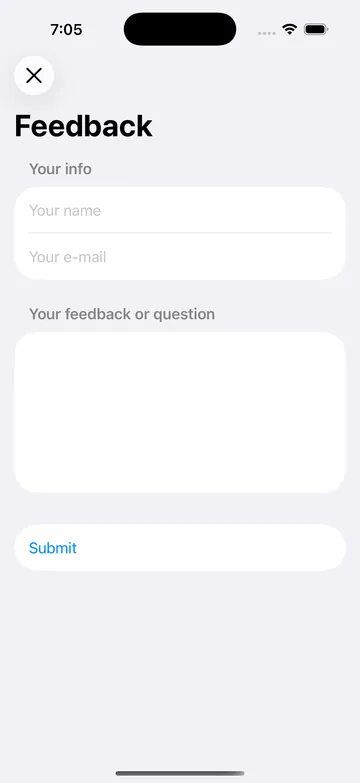
Send feedback from the app
The quickest way to reach me is from inside Level my RV:
- Open Level my RV on your iPhone or iPad.
- On the Home screen, tap Feedback or Question?
- Enter your name (optional), your e-mail address and your message, then tap Submit.
Your message comes straight to me, and I'll answer at the e-mail address you entered. The app tells you whether your message was sent. The feedback form needs an internet connection, so if you're off the grid, send it once you're back in coverage.
Your message includes the app version, which helps me track down problems. See the privacy policy for details.
Frequently asked questions
Is Level my RV free?
Yes. Level my RV is free on the App Store.
Which devices does it work on?
iPhone and iPad, plus Apple Watch as a display. Any of them can watch the measurements, and an iPhone or iPad can be the sensor on the RV floor.
Is the app available on Android?
Unfortunately, no. Level my RV is only available for iPhone, iPad and Apple Watch.
Do I need two devices?
No. On a single device, Level my RV is a precise level that shows how much to raise each side, and it doesn't need Bluetooth permission. A second iPhone, an iPad or an Apple Watch lets you watch the numbers from the driver's seat or from outside the RV.
Do I need to allow Bluetooth?
Only if you use two devices. With one device on the RV floor, the app never asks for Bluetooth. If you later want to watch the numbers on a second iPhone, iPad or Apple Watch, tap Enable under Share measurements with a second device in Settings. See Share with a second device.
I updated from 2.1 and sharing still works without doing anything. Is that right?
Yes. If you allowed Bluetooth before, the permission is kept and sharing stays on. You can now turn it off in Settings if you no longer need it.
How do I stop sharing?
In Settings, under Share measurements with a second device, turn the Share measurements switch off. This doesn't change the Bluetooth permission, so turning it back on later never shows a prompt.
Is a cellular or Wi-Fi signal required?
No. Level my RV uses Bluetooth to send measurements between the two devices, so it works in places with no cellular or Wi-Fi coverage.
What is the range between the two devices?
The distance between the two devices is limited by Bluetooth range. Expect about 30 to 50 feet (10 to 15 m), but it varies with your RV and surroundings.
My iPad, iPhone or Watch says “Waiting for a device to send a measurement…”
On the device on the RV floor, tap Level this RV and check the line under the title. It should say Sharing · waiting for a display or 1 display connected. If it says Sharing off, turn sharing on in Settings. See Troubleshooting for more.
The level screen says “Bluetooth not authorized”. What do I do?
Tap the line. It opens the app's page in iOS Settings, where the Bluetooth switch is. Turn it on and come back to the app.
What is “Device in a case or camera bump?”
A case or the camera bump keeps the phone from lying perfectly flat, so every reading is off by the same small angle. The Device offset page records that angle once and removes it from all future readings. Either level the RV with a bubble level first and put the phone on its floor, or use a surface at home you know is level. It's optional but recommended for the device you put on the floor. See Device offset.
I calibrated in 2.1. Do I have to do it again?
No. Your offset carries over and shows as Recorded by an earlier version of the app.
Why can't I type the RV length anymore?
Version 2.2 uses wheels (feet and inches, or meters and centimeters), so there's no keyboard to dismiss. Switching units converts the values for you.
Where did the introduction text on the Home screen go?
It became a one-time Welcome sheet on first install. The two buttons on the Home screen now explain themselves: Level this RV for the device on the floor, Watch from here for the device in your hand.
Does the app collect my data?
No personal data. The app sends anonymous usage statistics (device model, app version, settings, whether Bluetooth is allowed, and how sessions went) with a random install ID that isn't linked to you or your Apple ID. It never sends your level measurements or your location, and there's no account. The e-mail address you enter in the feedback form is used only to reply and isn't kept on the server. The full details are in the privacy policy.