 Level my RV
The old way
- “Left! No, your left!”
- “Keep coming… keep coming…”
- “STOP! Too far.”
- “Okay. Pull forward, we'll try again.”
A bubble level on the floor, a stack of blocks, and somebody yelling while the driver creeps forward blind.
Free · iPhone · iPad · Apple Watch
One iPhone on the floor, the numbers in your hand. Back onto the leveler, crank the jack, stop when it turns green.
Driver side 2.3″ · tongue 1.6″
Recorded on an earlier version of the app. Version 2.2 looks a little different, with the same idea.
A bubble level on the floor, a stack of blocks, and somebody yelling while the driver creeps forward blind.
The level is in your hand: at the driver's seat, at the tongue jack, or on your wrist. You see exactly how much is left, and you stop when it turns green. It works solo, and it works without a bar of signal.
Tell the app about your RV once at home. After that, every campsite goes the same way.
Tap Level this RV and lay that iPhone flat on the floor, top toward the front of the RV.

On a second iPhone or iPad, tap Watch from here, or open the app on your Apple Watch. It connects over Bluetooth by itself.
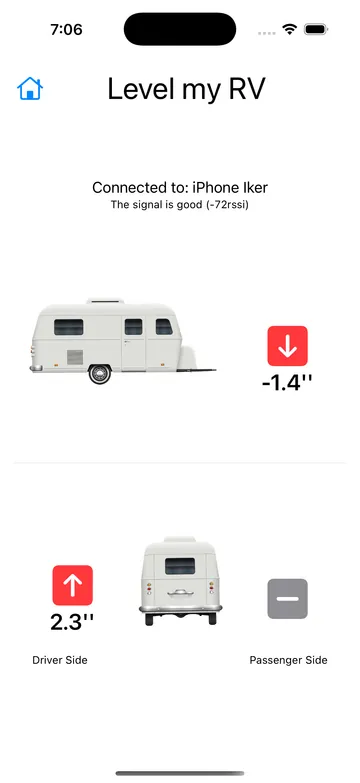
Red arrows say which side to raise or lower, and by how much. Drive onto your blocks or work the jack until every side turns green.
Built by an RVer, for RVers
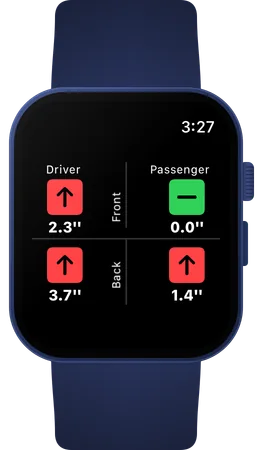
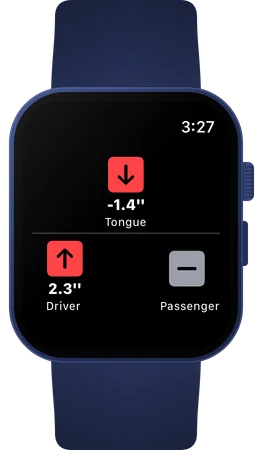
Open Level my RV on Apple Watch and tap Use the Watch as a display. You'll see the same arrows and numbers as on the iPhone on the floor, so both hands stay free for the jack or the steering wheel.
The Watch app never connects to the internet. Measurements travel from the sensor device to the Watch over Bluetooth only.
Want to see every screen? The user guide walks through setup, sharing and calibration step by step.
No. On one iPhone or iPad, Level my RV works as a precise level that shows how much to raise each side. A second iPhone, iPad or Apple Watch lets you watch those numbers from outside the RV or from the driver's seat.
Only if you use two devices. With one device on the RV floor, the app never asks for Bluetooth. To watch the numbers on a second iPhone, iPad or Apple Watch, tap Enable under Share measurements with a second device in Settings.
No. The devices talk directly over Bluetooth, so Level my RV works where there's no coverage at all.
That depends on Bluetooth range: typically 30 to 50 feet (10 to 15 m), depending on your RV and surroundings.
No. Level my RV is available only for iPhone, iPad and Apple Watch.
Level my RV is free on the App Store. Enter your RV's size once, and every arrival after that is a few minutes and no shouting.